Interactive Wall Panels Rhapsody Panel
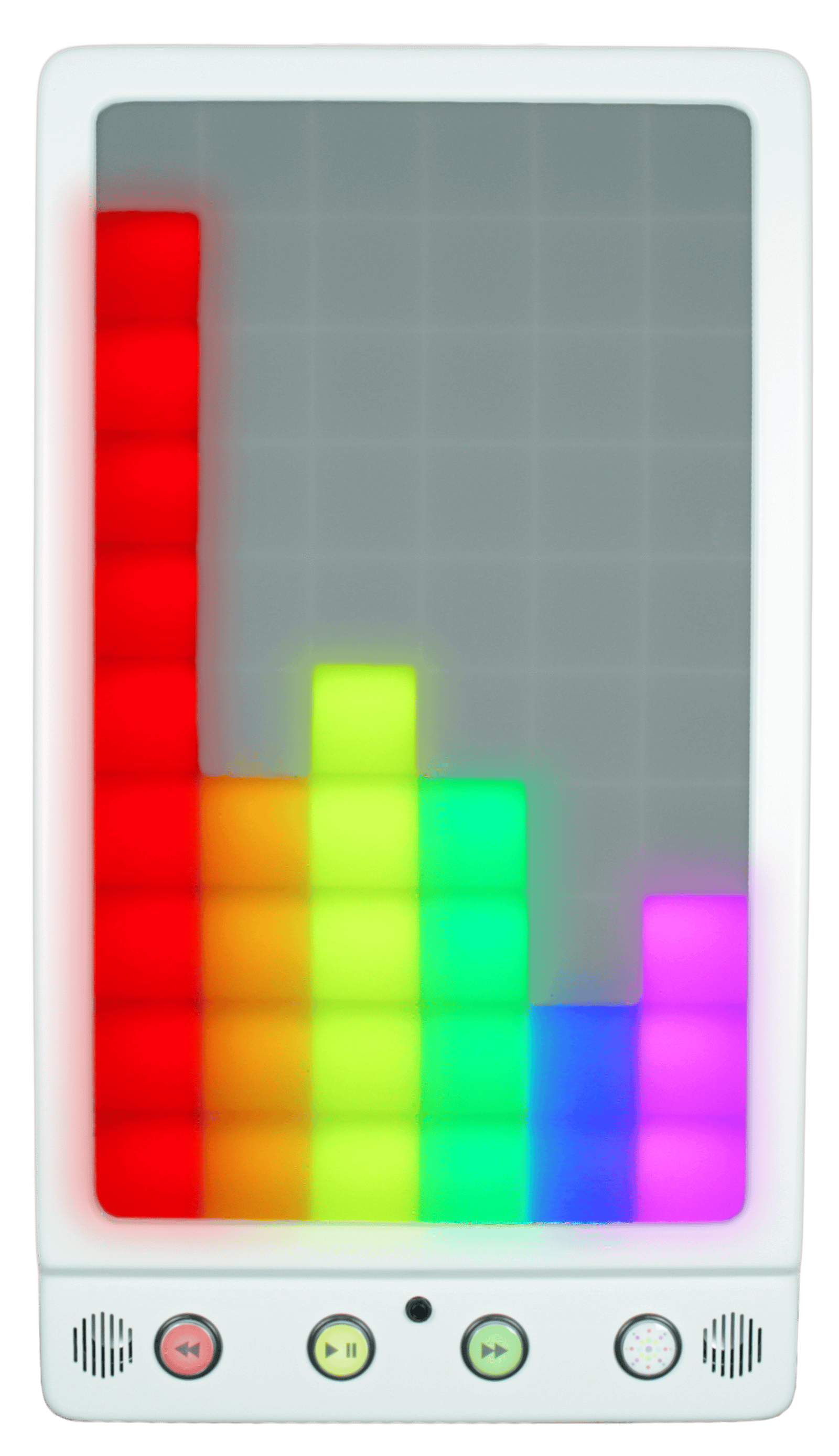
This panel offers both visual & auditory stimulation and contains numerous modes for developing self-confidence as well as speech & language therapy. The panel responds to volume and pitch via either micro SD card or microphone. H900 x W500 x D100mm
Product Details
Introducing the Causeway Sensory Interactive Rhapsody Panel
The Causeway Sensory Interactive Bubble Wall Panel offers both visual & auditory stimulation. The panel can be used passively as an attractive relaxed mood panel, or interactively with the numerous interactive modes such as spiral shape, colour ladder and graphic equalizer for developing self-confidence as well as speech & language therapy. The Rhapsody Panel can be used individually, in pairs or in groups to promote turn taking and social skills. The panel is excellent for developing self confidence as well as speech and language therapy. The panel responds to volume and pitch and has a filter for background noise. The sensitivity can be adjusted for both very loud and very quiet users. The panel responds to volume and pitch via either micro SD card or microphone.
Size: H900 x W500 x D100mm
Operation
The Causeway Sensory Interactive Rhapsody Panel is ready for use straight out of the box. Simply plug the panel into teh mains socket and switch on the power. The LCD display will light up and display a lock symbol. The panel will start in the last mode used. The unlock the panel, press and hold down the up and down arrow keys for 3 seconds.
The following menu options can now be accessed with the use of the arrow keys. Press OK button to select.
- Volume
- Brightness
- Speed
- Microphone Sensitivity
- Wireless Connectivity
- Pairing
Volume Brightness, Speed & Microphone Sensitivity: These options can be altered using th up and down arrow buttons. Press OK again to save the settings.
Wireless Conntectivity: Use arrow buttons to turn on/off. Press OK again to save the settings. When connectivity is turned on, the panel will be able to respond to other interactive products in the room.
Pairing: There are 5 pairing channels on the panel. Use arrown buttons to select a channel. Press OK again to save the settings. Channel 0 is the default setting. On this setting all compatible interactive remotes in the room will operate the panel.
Panel Buttons
The Bubble Panel ha 4 robust buttons at the base for easy access.
- Skip Back – Skip the music track back one.
- Play/ Pause – Play or pause the current pattern
- Skip Forward – Skip the music track forward one
- Pattern – Change the pattern.
SD Card: The panel comes with a micro SD card containing 14 music tracks. Users can replace this micro SD card with another to suit their own personal preferences.
External Microphone: A microphone is included as standard with every Rhapsody Panel. When this is plugged into the microphone socket, located between the blue and purple buttons, the internal microphone is disabled, allowing for more focused sound-to-light activities.
Modes: Press the Pattern Button to cycle through the 10 pattern modes listed below.
- Mode 1: Graphic Equaliser Vertical: 6 vertical coloured bars, each individually responding to its own level of pitch. Bars rise with increasing volume.
- Mode 2: Graphic Equaliser Horizontal: 6 horizontal coloured bars, each individually responding to its own level of pitch. Bars spreadh out from the centre point with increasing volume.
- Mode 3: Dynamic Rainbow Ladder: Coloured rungs light up with increasing volume, with lights going out as the sound volume dissipates
- Mode 4: Creeping Rainbow Ladder: Coloured rungs light up and stay lit with increasing volume, building all the way up to the top before the coloured ladder starts once again
- Mode 5: Step Rainbow Ladder: Coloured rungs light up one at a time each time a sound is made
- Mode 6: Spiral Out: A coloured spiral works it way out from the panel centre each time a sound is made. If enough sounds are mae, a 7×6 rectangle can be coloured in and a new colour starts. If sound is interrupted, the spiral retreats back to the centre again. the colour then changes
- Mode 7: Squares: All 60 squares are lit and slowly change colour when sounds are made. Stop talking, singing and or sound making, and the squaresstop changing colour until you encourage them to start up again with your sounds.
- Mode 8: Target: A central coloured square target is displayed. As the music gets louder, more coloured rings are added with increasing volume. Colours change every time the sound dips.
- Mode 9: Travelling Snake: Every time you talk or make a vocalisation, a square is lit and a travelling snake of lights works it way up the panel. When all square are lit, the colour then changes and the pattern starts again.
- Mode 10: Max Volume: A blue column of light reacts to sound volume., moving higher up the panel with increasing volume. When used with an oval remote, the background colour then changes to that selected by the remote, and the moving colour column changes to a contrasting colour.
Package Contents
- Causeway Sensory Interactive Rhapsody Panel
- Microphone and Cable
- Power Cable
Installation
To begin, you will need to remove the two white brackets from the back of the panel. Note the fixing on the top bracket will need to be removed. Once removed, locate the enclosed drilling template and use to drill mounting holes for the brackets. Once mounted, hang the Causeway Sensory Interactive Bubble Panel on the brackets and secure by replacing the top bracket fixing.
testset
Product Video
Interested in learning more? Request a callback today, and one of our experts will be in touch to discuss your needs.